 Barkley
The list
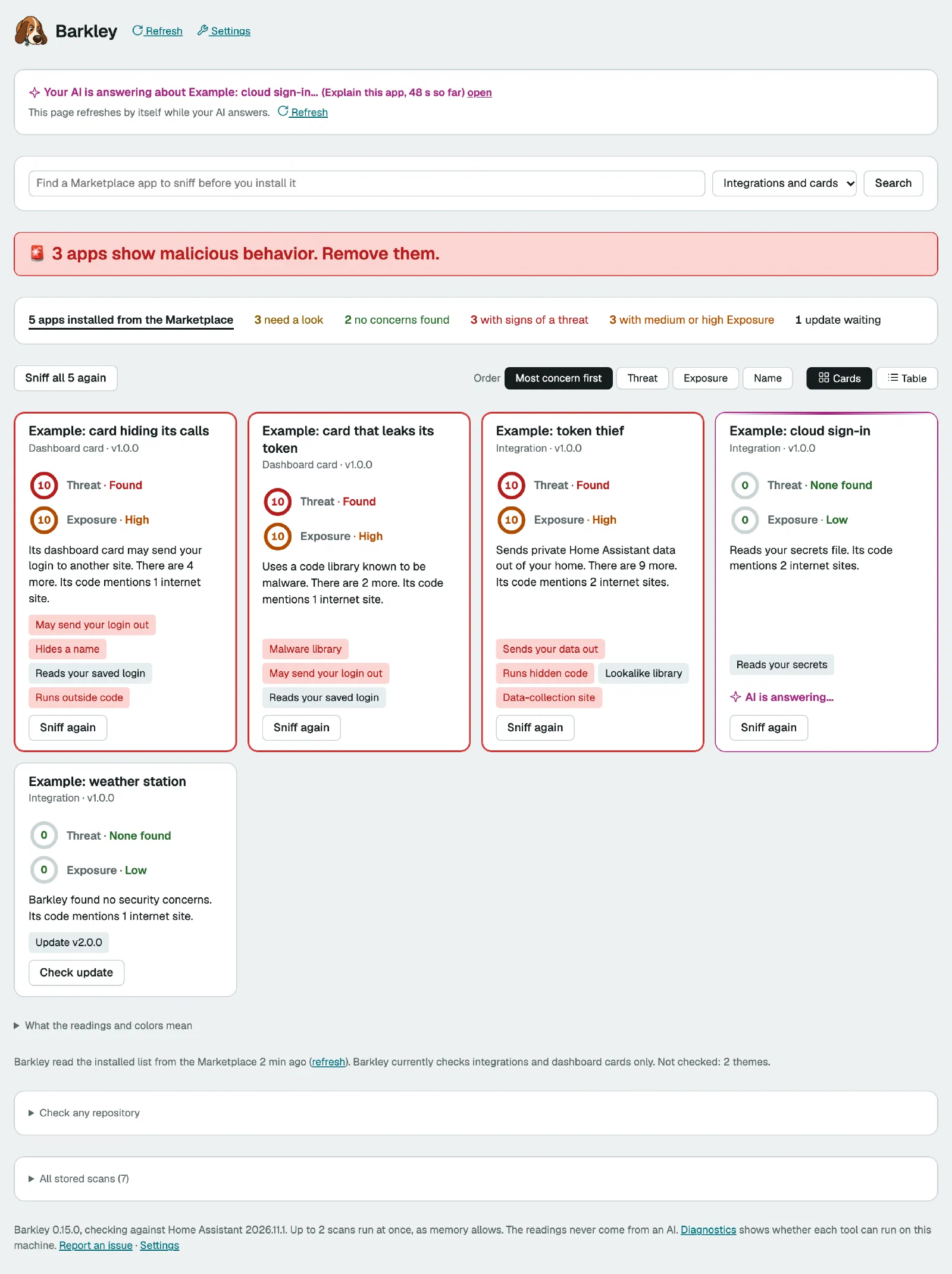
Barkley’s first page shows what you have installed through the Marketplace, with the version you run and the version the Marketplace would install now. Each app shows its two readings, Threat and Exposure.
What comes first
By default (Order: Most concern first) apps that weren’t checked yet come first, then the ones that need a look, then the rest. Within each, the highest Threat comes first, then the highest Exposure. The Order menu can also sort by Threat, by Exposure (highest first, not-checked apps last) or by name.
An app needs a look when the version you’d run has a found or possible threat or High exposure, when its check didn’t finish, or when a checked update brings a change to check. When any installed app has a found threat, one sentence at the top of the list says so.
Filters, views and pages
- The counts at the top are filters: needs a look, with signs of a threat, with medium or high Exposure, no concerns found, with privacy notes, updates waiting, and not checked. A filter shows when its count isn’t 0.
- Switch between cards (12 per page) and a table (25 per page). Barkley remembers the view.
- “What the readings and colors mean” under the list is the legend:
| Outline | Means |
|---|---|
| red | a threat found |
| yellow | a possible threat |
| orange | High exposure |
| none | no concerns found |
| dashed gray | not checked |
On a card, only a threat’s chip is red, and “Removed as critical” when the Marketplace removed the app for that; the other chips are neutral (“Removed from the Marketplace”, “Pre-release”, a quiet or archived project, “Sniffed with earlier rules”, an update to check). A purple chip marks a privacy note. Privacy notes never change a reading.
Buttons
- Sniff it on an app scans the version you have installed; Sniff again runs a fresh scan of it instead of reusing the stored one.
- Check update scans the offered version and shows what the update would change. See What an update would change.
- Sniff N apps not yet sniffed with the current rules scans every installed app that has no scan with Barkley’s current rules. A Barkley update keeps its stored scans unless it changed what a scan finds (its rules, its checks or the scanner tools). Sniff N unfinished again repeats every scan that didn’t finish. When every app has a scan, Sniff all N again runs a fresh scan of each, one after another (the memory guard still checks each one). Apps already queued or running are skipped.
A button brings you back to the page, filter and view you clicked it on.
While something runs
A status box at the top shows what is being sniffed, what is queued and what just finished, and the page reloads itself every 5 seconds until the work is done. The panel uses no JavaScript, so that reload is how progress is shown.
Further down
- Sniffed, not installed: apps you sniffed from search. Their scans are deleted after 7 days unless you install the app. One sniffed with earlier rules is marked so, with a button to sniff it again (and one for all of them).
- Check any repository: sniff a repository by name, at the release the Marketplace would install or at a tag you give.
- What would updating change? for a repository and tag you name.
- All stored scans and the Jobs table.
- The search box, and the links to Diagnostics, Report an issue (a new public issue on Barkley’s GitHub with the versions filled in) and Settings.